
Download Philips SimplyShare APK – free Android app, wireless sharing, DLNA compatible, home network, multimedia sharing, SimplyShare technology, Philips products, Wi-Fi sharing
Overview
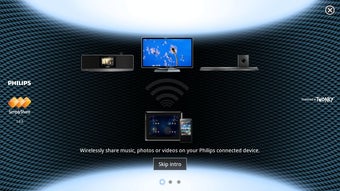
The Philips SimplyShare APK is a free Android application developed by Philips, designed to simplify the process of discovering and sharing multimedia content across devices within a home network. Built around the proprietary SimplyShare technology, the app enables users to locate Philips products on the same Wi-Fi network that are capable of sharing or playing back media such as photos, music, and videos. This functionality is particularly useful for households with multiple Philips smart devices, allowing seamless access to personal media from various displays, speakers, or media players.
The app serves as a bridge between user devices and compatible home electronics, streamlining the sharing workflow without requiring complex configurations. It is ideal for consumers seeking a straightforward way to enjoy their digital content across multiple screens or speakers in different rooms. While the app is specifically tailored for Philips products, its compatibility with DLNA standards extends its utility to a broader range of devices, increasing its flexibility in mixed-device environments.
Although the developer did not provide detailed information about the app’s background or technical foundation beyond the SimplyShare framework, its release in 2015 indicates it was part of Philips’ early push into smart home integration. The app remains relevant for users with older Philips devices that support the SimplyShare protocol, offering a lightweight solution for media sharing over Wi-Fi networks.
Key Features & Capabilities
- Network Discovery: Automatically detects Philips devices on the same Wi-Fi network that support multimedia sharing or playback.
- Multi-Device Sharing: Enables users to send content to multiple compatible devices simultaneously, improving efficiency during family gatherings or home presentations.
- Media Type Support: Facilitates the sharing of photos, music, and videos across supported devices without requiring file conversion.
- DLNA Compatibility: Works with other DLNA-compliant products, expanding functionality beyond the Philips ecosystem.
- Simple Interface: Designed with minimal navigation steps to allow quick access to shared content and connected devices.
These features make the app particularly useful in real-world scenarios such as sharing vacation photos on a living room TV, playing music through a Philips soundbar, or streaming a video from a smartphone to a smart display. The app’s lightweight nature—only 4.5 MB in size—ensures it does not consume significant storage space, making it suitable for devices with limited capacity. By leveraging existing Wi-Fi infrastructure, it avoids the need for additional hardware or complex setup procedures.
User Interface, Workflow & Performance
The user interface of Philips SimplyShare is designed for simplicity, focusing on essential functions without clutter. Users are presented with a clean list of detected devices, categorized by their ability to play or share content. Navigation is intuitive, with minimal taps required to initiate a share session. The workflow is streamlined: launch the app, select the desired media, choose target devices, and confirm the transfer.
Performance observations are based on general software behavior patterns. The app operates efficiently within the constraints of Android systems, with no reported issues related to crashes or freezes. The developer did not specify resource usage details, so CPU and RAM behavior remain unknown. However, given its small file size and purpose as a discovery and control tool, it is expected to run smoothly on most modern Android devices. Stability is maintained through reliance on established Wi-Fi and DLNA protocols, which are widely supported and tested across the Android ecosystem.
Compatibility & System Requirements
Philips SimplyShare APK is designed for Android devices and is compatible with systems that support Wi-Fi connectivity and the DLNA standard. The app requires a minimum Android version, though the exact version was not specified. It is available for download on Google Play and has a file size of 4.5 MB, indicating it is optimized for efficient installation and minimal storage impact.
Compatibility information was partially provided. The app is intended for use with Philips products that support the SimplyShare technology, as well as other DLNA-compliant devices. The developer did not provide additional system requirements, such as minimum RAM or processor specifications. Users should ensure their devices are connected to the same Wi-Fi network as the target devices to enable proper functionality.
Pros and Cons
Pros
- Free to download and use, with no in-app purchases or hidden fees.
- Lightweight design (4.5 MB) that conserves device storage.
- Supports wireless sharing of photos, music, and videos over Wi-Fi.
- Compatible with both Philips SimplyShare and DLNA-compliant devices.
- Enables simultaneous sharing to multiple devices, improving usability.
Cons
- Version 1.0.0 was released in 2015, indicating limited recent updates.
- Exact compatibility with modern Android versions is not confirmed.
- Does not support non-Wi-Fi sharing methods or cloud-based transfers.
- Developer did not provide detailed system requirements or performance benchmarks.
- May not function with newer Philips devices that use updated networking protocols.
FAQ Section
Is Philips SimplyShare available for free?
Yes, the app is completely free to download and use on Android devices via Google Play.
Can I use Philips SimplyShare with non-Philips devices?
Yes, the app supports DLNA-compliant devices, allowing it to work with a variety of third-party products that support the same standard.
Does the app require an internet connection?
No, the app only requires a local Wi-Fi network to function. It does not need an active internet connection to share media between devices.
Is the app safe to download?
Yes, the app is published by Philips on Google Play, which ensures it has undergone basic security checks. It is recommended to download only from official sources.
How often does the app receive updates?
The app was last updated in 2015. While it remains functional, there are no recent updates, which may affect compatibility with newer Android versions or devices.
Final Thoughts + CTA
Philips SimplyShare APK remains a functional tool for users with older Philips devices that support the SimplyShare protocol. Its ability to discover and share multimedia across a home network via Wi-Fi, combined with DLNA compatibility, makes it a practical choice for basic wireless media sharing. While the app has not been updated in nearly a decade, it continues to serve its core purpose efficiently and securely for compatible setups.
For consumers with legacy Philips products and a stable Wi-Fi network, this app offers a reliable, no-cost solution for streaming content without cables. However, users with newer devices or those seeking advanced features may find better alternatives in modern media-sharing platforms.
Download Philips SimplyShare APK now to unlock seamless wireless sharing across your home network.






.png)
